

The two kinds of capability
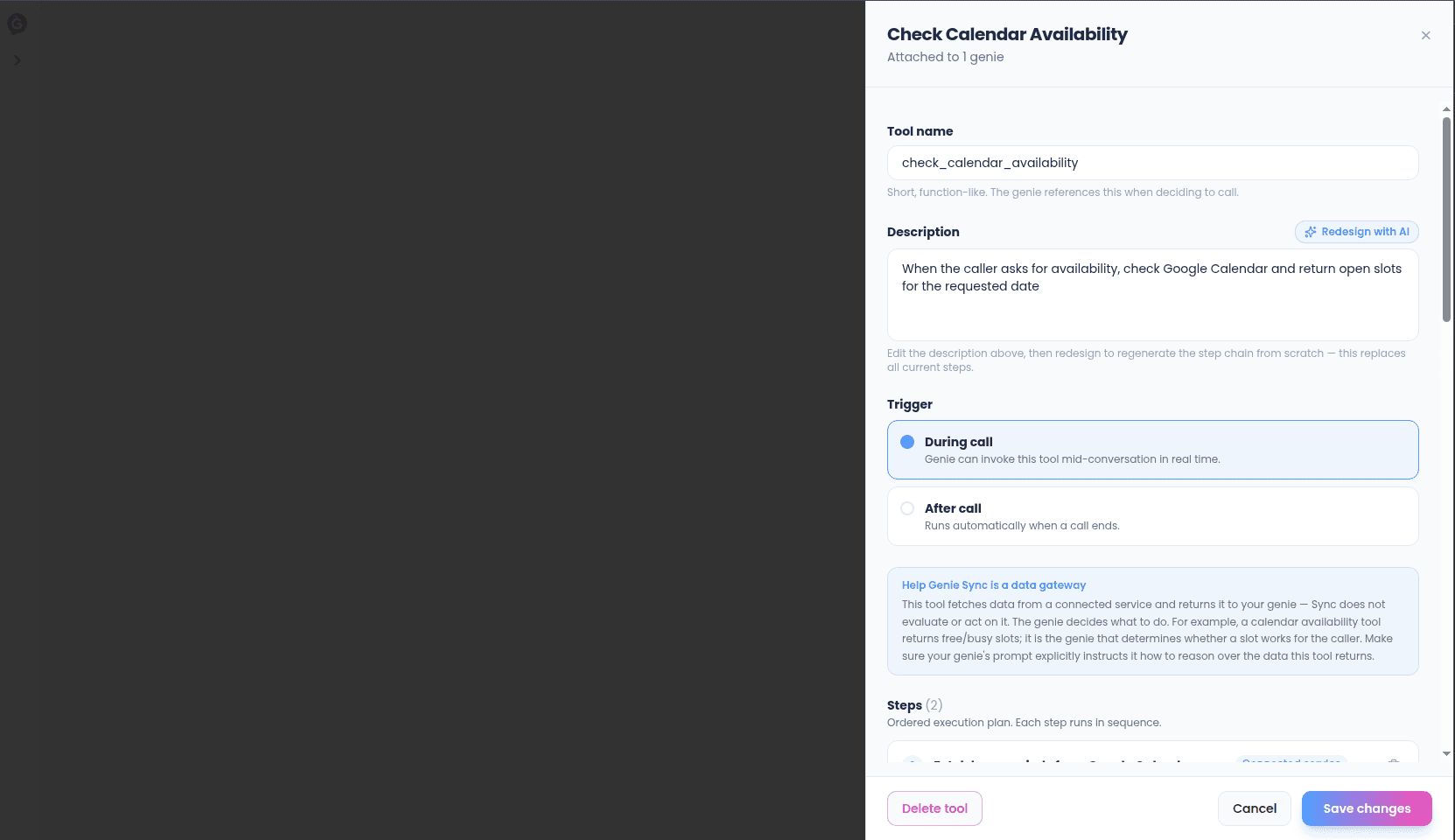
Every capability is either:- During a call — the genie can call this mid-conversation, live, while the caller is on the line.
- After a call — runs automatically the moment a call ends, no genie decision involved.
- A during-call capability must have an input schema — the list of pieces of information the genie needs to fill in before it can call this capability (for example, an order number or an email address). Each piece needs its own plain-language description, since that’s what the genie reads to decide what to ask the caller for.
- An after-call capability skips the input schema entirely — there’s no caller to ask anything of anymore, so it works from whatever the call itself produced (the transcript, the outcome, who called).
Name and description
- Name — keep it short and function-like. This is what the genie sees when deciding whether this capability is the right one to reach for.
- Description — write this in plain language, and be specific. This is the single biggest driver of whether your genie calls the right capability at the right moment — a vague description gets skipped or misused.
Building the step chain
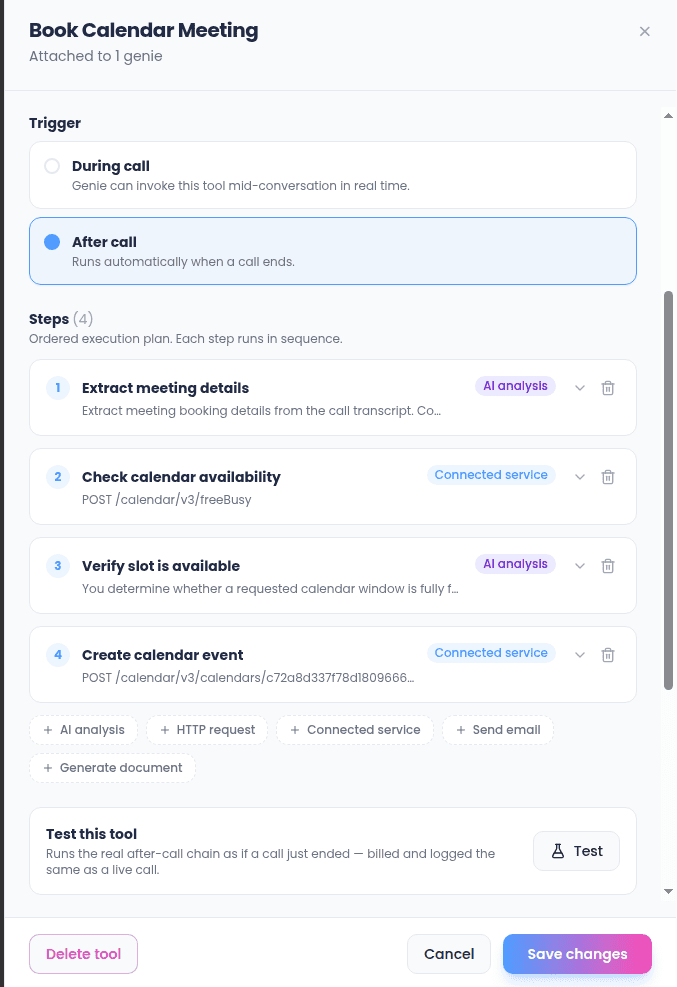
A capability is a chain of one or more steps, run strictly in order — top to bottom, no branching. Each step has:- A label — just for you, to keep the chain readable.
- An executor type — what this step actually does (see the five types below).
- An on-failure behavior — Abort (stop the whole chain right here) or Continue (move to the next step anyway). Pick Continue for steps that are “nice to have” but shouldn’t block the rest of the chain; pick Abort for anything later steps depend on.
- An optional output key — a name you give this step’s result so a later step in the same chain can reference it. Leave it blank if nothing downstream needs this step’s output.
The five executor types
Every step is one of these five.Smart analysis
Hands text to Sync to interpret, summarize, extract structured information from, or reason over. Useful as a step that reads what an earlier step found and turns it into something usable by the steps after it (or by the genie). If this step defines a gate field — a true/false field in its own output — the chain checks that field after the step runs: if it comes back false, the whole chain stops here, even if this step’s own on-failure setting is “Continue.” Use a gate field when a later step should only run under a condition only this step can determine (for example, “only proceed if the caller’s request is clearly a cancellation”).HTTP request
Calls any address on the internet directly — a method (GET, POST, PUT, PATCH, or DELETE), the address to call, whatever headers it needs, and a request body if the method sends one. Use this for services that don’t have a saved connection, or for one-off calls you don’t want to wire up as a full connection.Connected service
The same idea as an HTTP request, but routed through one of your saved connections instead of a raw address — so credentials are already handled, and you just pick which connection and which part of that service to call. This is the step type to reach for whenever the system you need is already connected.Send email
Sends an email: a recipient, a subject line, and the body content. The body can be built from simple content blocks (a heading, a paragraph, a bulleted list, a table) instead of raw text, and you can attach files or set a logo for the email header.Generate document
Produces a downloadable file — CSV, plain text, or PDF — with a file name you choose. For CSV and PDF you provide the column headers and rows; for plain text you provide the text content directly.Passing information between steps
Later steps can use what earlier steps found. Give a step an output key, and any step further down the chain can pull that value into its own configuration — so, for example, a “look up the customer” step’s result can feed directly into the “send confirmation email” step’s recipient field, without you re-typing anything.Speed matters (during-call capabilities)
A during-call capability runs while someone is on the phone waiting for an answer — so it has a strict 400-millisecond response budget. If a capability is consistently slow, you’ll see that reflected in its activity log; it’s usually a sign the system it depends on is responding too slowly, not a problem with the capability’s own configuration. This limit doesn’t apply to after-call capabilities, since the call has already ended by the time those run.What Sync does — and doesn’t — decide
For during-call capabilities specifically: Sync’s job is to fetch or return data, not to reason over it or decide what to say next. The genie itself, not the capability, is what interprets the result and decides how to respond to the caller. Keep that in mind when writing a capability’s description and output — the clearer and more literal the data you hand back, the better the genie can use it.Testing a capability
Every capability has a Test button once it has at least one step. Testing a during-call capability lets you fill in sample values for whatever the input schema asks for (anything left blank falls back to a generic placeholder) and runs the real chain — not a preview. Testing an after-call capability runs the real chain as if a call had just ended, and is billed and logged exactly like a live call would be; if the chain includes a Send email step, you’ll be warned before the test actually sends one.Some tests complete immediately and show you each step’s result right there. Others are dispatched as a real background run — in that case you’ll get a toast with an execution id, and you can find the full result in the Activity log.