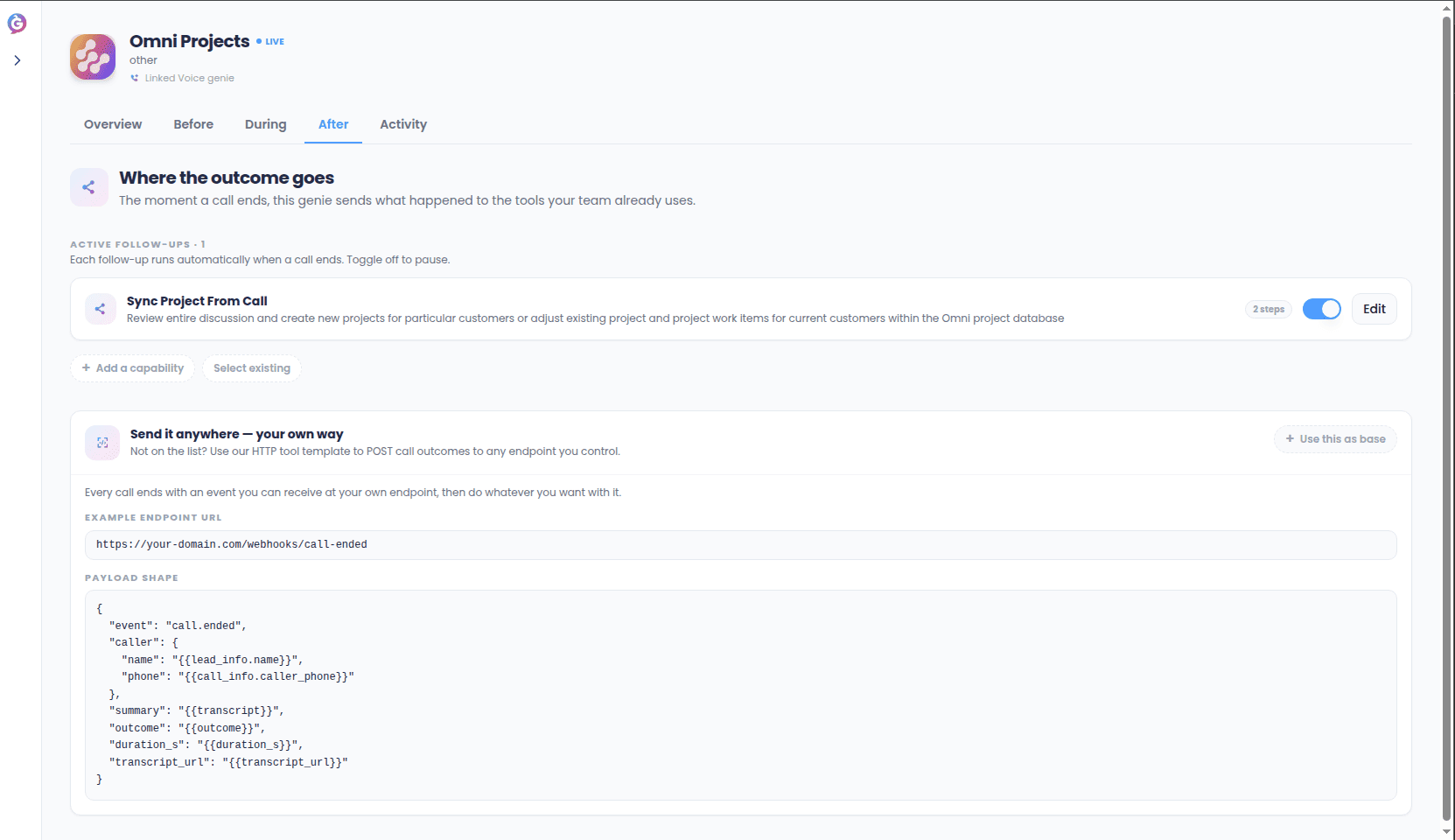
The After tab on a genie’s page is titled “Where the outcome goes” — this is Sync’s name for post-call actions: things that happen automatically right after a call wraps up, the follow-up work a human agent would otherwise have to do by hand.
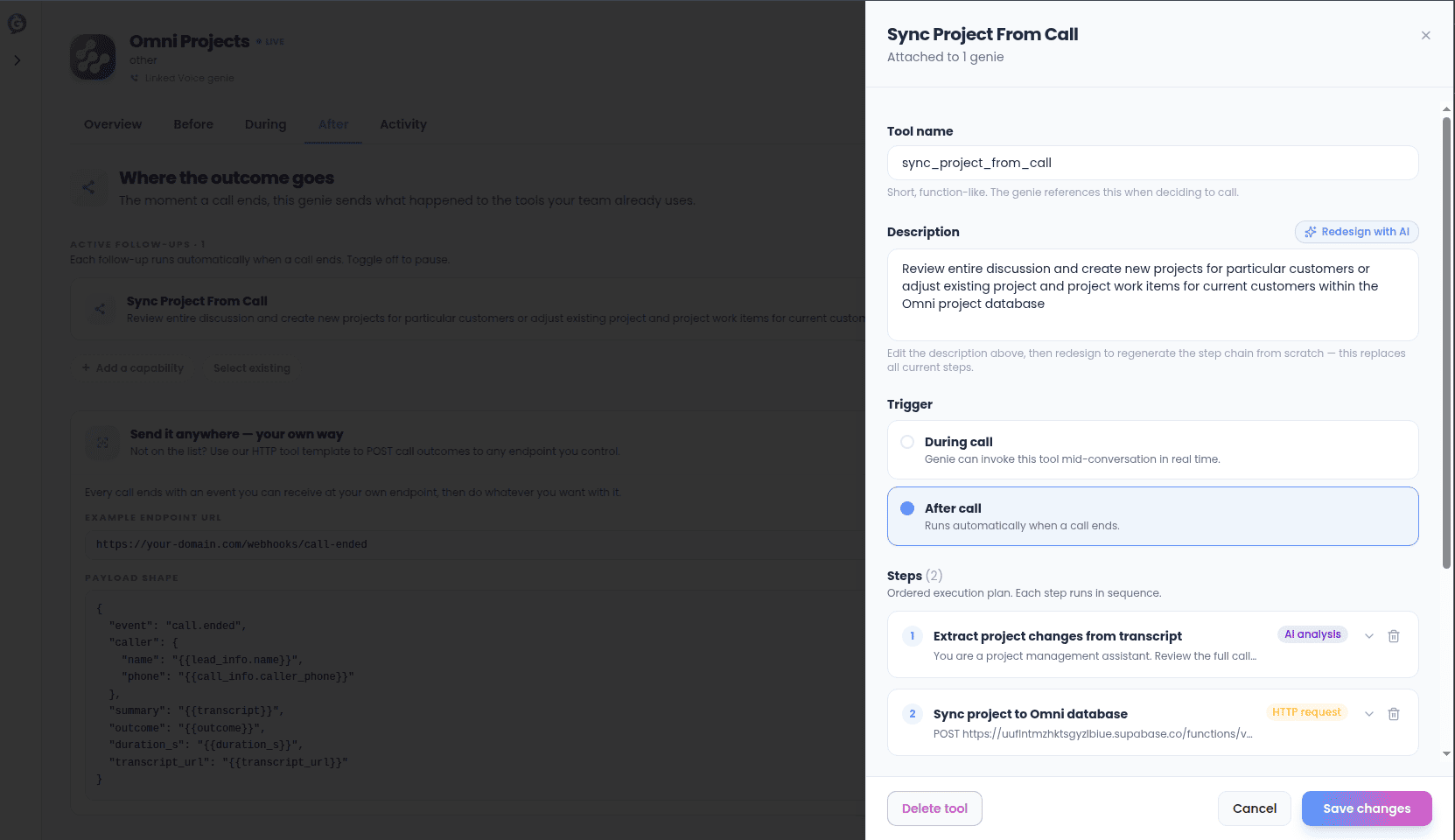
Each post-call action is a capability tied to a connection, built the same way any after-call capability is. It runs automatically once a call ends, and you can turn any individual action on or off with its toggle on the After tab without deleting it.There’s also a manual Test option in the action’s editor.
Test runs the real chain, the same as testing any capability — so it can send a real email or call a real API.
If your team wants to build something more custom on top of a call ending, the After tab also offers a ready-made HTTP request starting point with the exact shape of the call-outcome data already filled in (who called, how long, the summary, the outcome, a link to the transcript) — you just add the address it should be sent to, instead of building a capability from a blank form.
Post-call actions are things your genie does — a CRM note, a webhook call, a generated document. They’re separate from the notification channels you turn on per genie in its Notify me tab, which control whether you and your team get pinged (Slack, Telegram, and others) about what a genie did. Use post-call actions to act on the call outcome; use Notify Me to be told about it.
Every post-call action’s run shows up in your Activity log, so you can always confirm a CRM note actually landed, or a Slack message actually sent.
{"docsConfig":{"theme":"mint","$schema":"https://mintlify.com/docs.json","name":"Help Genie","description":"API documentation for the Help Genie voice AI platform","colors":{"primary":"#4E9CFF","light":"#7BB8FF","dark":"#2B7FE8"},"logo":{"light":"https://mintcdn.com/helpgenie/a134Jyg1BOpqw0vP/logo/light.png?fit=max\u0026auto=format\u0026n=a134Jyg1BOpqw0vP\u0026q=85\u0026s=f29d097a201254a8a750843d0d692c50","dark":"https://mintcdn.com/helpgenie/a134Jyg1BOpqw0vP/logo/dark.png?fit=max\u0026auto=format\u0026n=a134Jyg1BOpqw0vP\u0026q=85\u0026s=f00cbee677f1f3a3f46d463cb7cbad38","href":"https://helpgenie.ai"},"favicon":"https://mintcdn.com/helpgenie/17V8AwVjtycIuhCm/favicon.svg?fit=max\u0026auto=format\u0026n=17V8AwVjtycIuhCm\u0026q=85\u0026s=8a7865e1c10e3dacc378789f70f5ef6e","navbar":{"links":[{"href":"mailto:support@helpgenie.ai","label":"Support"}],"primary":{"type":"button","label":"Dashboard","href":"https://helpgenie.ai/dashboard"}},"footer":{"socials":{"linkedin":"https://linkedin.com/company/helpgenie"}},"contextual":{"options":["copy","view","chatgpt","claude"],"display":"header"},"styling":{"latex":false},"navigation":{"global":{"anchors":[{"anchor":"Help Genie Voice","icon":"microphone","href":"https://helpgenie.ai"},{"anchor":"Help Genie Mail","icon":"envelope","href":"https://mail.helpgenie.ai"},{"anchor":"Help Genie Outbound","icon":"phone","href":"https://outbound.helpgenie.ai"},{"anchor":"Help Genie Sync","icon":"arrows-rotate","href":"https://sync.helpgenie.ai"}]},"pages":[]}},"deployment":{"deploymentMetadataValue":{"subdomain":"helpgenie","hasAudioNarration":false,"actualSubdomain":"helpgenie","customDomains":["docs.helpgenie.ai"],"gitSource":{"type":"github","owner":"help-genie-ai","repo":"help-genie-docs","deployBranch":"main","contentDirectory":"","isPrivate":true,"mountPath":"","label":""},"chroma":{"liveDeploymentHistoryId":"6ae87ce4b4392014d523c4e2","collectionId":"bbae4e4b-9002-4a93-98f2-e08770fa65d5","schemaVersion":"v3","latestBuiltDeploymentHistoryId":"6ae87ce4b4392014d523c4e2"},"entitlements":{},"buildId":"6ae87ce4b4392014d523c4e2","clientVersion":"0.0.4067","searchFilterCounts":[{"language":"default","tag":"API reference","count":57},{"language":"default","tag":"Voice","count":33},{"language":"default","tag":"Overview","count":20},{"language":"default","tag":"Expanded Platform","count":17},{"language":"default","tag":"Sync","count":13},{"language":"default","tag":"Mail","count":11},{"language":"default","tag":"Outbound","count":9},{"language":"default","tag":"Knowledge","count":7},{"language":"default","tag":"Working with mail","count":6},{"language":"default","tag":"Configuring a Genie","count":6}]},"assistantConfig":{"enableAskAiButton":false,"enableStarterQuestions":false,"enableAskAiSearchBar":true},"basePath":"","hasChatPermissions":false,"hasWebMcpPermissions":false,"toggles":[{"name":"kill-isr","enabled":true,"variant":{"name":"disabled","enabled":false,"feature_enabled":true},"impressionData":false},{"name":"agent-mintlify-slack","enabled":true,"variant":{"name":"disabled","enabled":false,"feature_enabled":true},"impressionData":false},{"name":"agent-integrations-settings","enabled":true,"variant":{"name":"disabled","enabled":false,"feature_enabled":true},"impressionData":false},{"name":"rbac-expansion","enabled":true,"variant":{"name":"disabled","enabled":false,"feature_enabled":true},"impressionData":false},{"name":"automations-pr-grouping","enabled":true,"variant":{"name":"disabled","enabled":false,"feature_enabled":true},"impressionData":false},{"name":"custom-prefix","enabled":true,"variant":{"name":"disabled","enabled":false,"feature_enabled":true},"impressionData":false},{"name":"analytics-v7","enabled":true,"variant":{"name":"disabled","enabled":false,"feature_enabled":true},"impressionData":false},{"name":"user-flows-analytics","enabled":true,"variant":{"name":"disabled","enabled":false,"feature_enabled":true},"impressionData":false},{"name":"no-publish-flow","enabled":true,"variant":{"name":"disabled","enabled":false,"feature_enabled":true},"impressionData":false},{"name":"workos-onboarding","enabled":true,"variant":{"name":"disabled","enabled":false,"feature_enabled":true},"impressionData":false},{"name":"llms-txt-v2","enabled":true,"variant":{"name":"disabled","enabled":false,"feature_enabled":true},"impressionData":false},{"name":"snapshot-serving-live","enabled":true,"variant":{"name":"disabled","enabled":false,"feature_enabled":true},"impressionData":false},{"name":"stripTemperatureMiddleware","enabled":true,"variant":{"name":"disabled","enabled":false,"feature_enabled":true},"impressionData":false},{"name":"support-platform-pylon-zendesk","enabled":true,"variant":{"name":"disabled","enabled":false,"feature_enabled":true},"impressionData":false},{"name":"snapshot-serving","enabled":true,"variant":{"name":"disabled","enabled":false,"feature_enabled":true},"impressionData":false},{"name":"instant-rollback","enabled":true,"variant":{"name":"disabled","enabled":false,"feature_enabled":true},"impressionData":false},{"name":"granular-notifications-server","enabled":true,"variant":{"name":"disabled","enabled":false,"feature_enabled":true},"impressionData":false},{"name":"granular-notifications","enabled":true,"variant":{"name":"disabled","enabled":false,"feature_enabled":true},"impressionData":false},{"name":"automations-fable","enabled":true,"variant":{"name":"disabled","enabled":false,"feature_enabled":true},"impressionData":false},{"name":"fixed-ai-action-pricing","enabled":true,"variant":{"name":"disabled","enabled":false,"feature_enabled":true},"impressionData":false},{"name":"automation-resolve-merge-conflict","enabled":true,"variant":{"name":"disabled","enabled":false,"feature_enabled":true},"impressionData":false},{"name":"scoped-publishing","enabled":true,"variant":{"name":"disabled","enabled":false,"feature_enabled":true},"impressionData":false},{"name":"mintql","enabled":true,"variant":{"name":"disabled","enabled":false,"feature_enabled":true},"impressionData":false},{"name":"page-level-analytics","enabled":true,"variant":{"name":"disabled","enabled":false,"feature_enabled":true},"impressionData":false},{"name":"editor-version-history-v2","enabled":true,"variant":{"name":"disabled","enabled":false,"feature_enabled":true},"impressionData":false},{"name":"billing-page-v2","enabled":true,"variant":{"name":"disabled","enabled":false,"feature_enabled":true},"impressionData":false},{"name":"full-page-search","enabled":true,"variant":{"name":"disabled","enabled":false,"feature_enabled":true},"impressionData":false},{"name":"workspace-projects","enabled":true,"variant":{"name":"disabled","enabled":false,"feature_enabled":true},"impressionData":false},{"name":"assistant-v5","enabled":true,"variant":{"name":"disabled","enabled":false,"feature_enabled":true},"impressionData":false},{"name":"fork-pr-previews","enabled":true,"variant":{"name":"disabled","enabled":false,"feature_enabled":true},"impressionData":false},{"name":"revalidation-jwt","enabled":true,"variant":{"name":"disabled","enabled":false,"feature_enabled":true},"impressionData":false},{"name":"vite-origin","enabled":true,"variant":{"name":"disabled","enabled":false,"feature_enabled":true},"impressionData":false},{"name":"workos-sso-scim","enabled":true,"variant":{"name":"disabled","enabled":false,"feature_enabled":true},"impressionData":false},{"name":"hobby-abuse-scan","enabled":true,"variant":{"name":"disabled","enabled":false,"feature_enabled":true},"impressionData":false},{"name":"dashboard-inbox","enabled":true,"variant":{"name":"disabled","enabled":false,"feature_enabled":true},"impressionData":false},{"name":"workos-signup","enabled":true,"variant":{"name":"disabled","enabled":false,"feature_enabled":true},"impressionData":false},{"name":"turbopuffer-dual-write","enabled":true,"variant":{"name":"disabled","enabled":false,"feature_enabled":true},"impressionData":false},{"name":"workos-enabled","enabled":true,"variant":{"name":"disabled","enabled":false,"feature_enabled":true},"impressionData":false},{"name":"approve-review-flow","enabled":true,"variant":{"name":"disabled","enabled":false,"feature_enabled":true},"impressionData":false},{"name":"sso-setup-deadline-banner","enabled":true,"variant":{"name":"disabled","enabled":false,"feature_enabled":true},"impressionData":false},{"name":"turbopuffer-serve","enabled":true,"variant":{"name":"disabled","enabled":false,"feature_enabled":true},"impressionData":false}],"googleFontsInlined":false},"customCss":[],"page":{"pagePath":"sync-guide/post-call-actions","slug":"/sync-guide/post-call-actions","pageMetadata":{"title":"Post-Call Actions","description":"Automatically follow up the moment a call ends.","href":"/sync-guide/post-call-actions"},"description":{"compiledSource":"\"use strict\";\nconst {jsx: _jsx} = arguments[0];\nconst {useMDXComponents: _provideComponents} = arguments[0];\nfunction _createMdxContent(props) {\n const _components = {\n p: \"p\",\n ..._provideComponents(),\n ...props.components\n };\n return _jsx(_components.p, {\n children: \"Automatically follow up the moment a call ends.\"\n });\n}\nfunction MDXContent(props = {}) {\n const {wrapper: MDXLayout} = {\n ..._provideComponents(),\n ...props.components\n };\n return MDXLayout ? _jsx(MDXLayout, {\n ...props,\n children: _jsx(_createMdxContent, {\n ...props\n })\n }) : _createMdxContent(props);\n}\nreturn {\n default: MDXContent\n};\n","frontmatter":{},"scope":{}},"pageType":"default","mdx":{"mdxSource":{"compiledSource":"\"use strict\";const{Fragment:_Fragment,jsx:_jsx,jsxs:_jsxs}=arguments[0];const{useMDXComponents:_provideComponents}=arguments[0];function _createMdxContent(props){const _components={a:`a`,em:`em`,li:`li`,p:`p`,strong:`strong`,ul:`ul`,..._provideComponents(),...props.components},{Frame,Heading,OptimizedImage,Warning}=_components;if(!Frame)_missingMdxReference(`Frame`,true);if(!Heading)_missingMdxReference(`Heading`,true);if(!OptimizedImage)_missingMdxReference(`OptimizedImage`,true);if(!Warning)_missingMdxReference(`Warning`,true);return _jsxs(_Fragment,{children:[_jsxs(_components.p,{children:[`The `,_jsx(_components.strong,{children:`After`}),` tab on a genie’s page is titled `,_jsx(_components.strong,{children:`“Where the outcome goes”`}),` — this is Sync’s name for post-call actions: things that happen automatically right after a call wraps up, the follow-up work a human agent would otherwise have to do by hand.`]}),`\n`,_jsx(Heading,{level:`2`,id:`common-actions`,children:`Common actions`}),`\n`,_jsxs(_components.ul,{children:[`\n`,_jsxs(_components.li,{children:[_jsx(_components.strong,{children:`Log a note in your CRM`}),` — HubSpot, Salesforce, or similar, so every call leaves a trail.`]}),`\n`,_jsxs(_components.li,{children:[_jsx(_components.strong,{children:`Post a summary to your team`}),` — a Slack message with the call recap and outcome.`]}),`\n`,_jsxs(_components.li,{children:[_jsx(_components.strong,{children:`Add a calendar event`}),` — for calls that end in a scheduled follow-up.`]}),`\n`,_jsxs(_components.li,{children:[_jsx(_components.strong,{children:`Send a recap email`}),` — a friendly summary sent straight to the caller.`]}),`\n`,_jsxs(_components.li,{children:[_jsx(_components.strong,{children:`Trigger a webhook`}),` — for anything else your own systems need to react to.`]}),`\n`]}),`\n`,_jsx(Frame,{children:_jsx(OptimizedImage,{src:`https://mintcdn.com/helpgenie/2LU0lzABU1lS6XRW/images/sync-guide/post-call-actions-list.png?fit=max\u0026auto=format\u0026n=2LU0lzABU1lS6XRW\u0026q=85\u0026s=3c16adab45f8c602b5bbb7f9d70b01bf`,alt:`After tab (\"Where the outcome goes\") showing the list of configured post-call actions`,\"data-og-width\":`1663`,width:`1663`,\"data-og-height\":`960`,height:`960`,\"data-path\":`images/sync-guide/post-call-actions-list.png`,\"data-optimize\":`true`,\"data-opv\":`3`,srcset:`https://mintcdn.com/helpgenie/2LU0lzABU1lS6XRW/images/sync-guide/post-call-actions-list.png?w=280\u0026fit=max\u0026auto=format\u0026n=2LU0lzABU1lS6XRW\u0026q=85\u0026s=ab97eefcdfd75bc5cce0686897f7592a 280w, https://mintcdn.com/helpgenie/2LU0lzABU1lS6XRW/images/sync-guide/post-call-actions-list.png?w=560\u0026fit=max\u0026auto=format\u0026n=2LU0lzABU1lS6XRW\u0026q=85\u0026s=5002aa227b98206fa50b9e6b33339f2c 560w, https://mintcdn.com/helpgenie/2LU0lzABU1lS6XRW/images/sync-guide/post-call-actions-list.png?w=840\u0026fit=max\u0026auto=format\u0026n=2LU0lzABU1lS6XRW\u0026q=85\u0026s=09d9616ed8e4b0cd45e38c4aeea5742e 840w, https://mintcdn.com/helpgenie/2LU0lzABU1lS6XRW/images/sync-guide/post-call-actions-list.png?w=1100\u0026fit=max\u0026auto=format\u0026n=2LU0lzABU1lS6XRW\u0026q=85\u0026s=e04bdef35484da74edc1d0b7d9a8ca32 1100w, https://mintcdn.com/helpgenie/2LU0lzABU1lS6XRW/images/sync-guide/post-call-actions-list.png?w=1650\u0026fit=max\u0026auto=format\u0026n=2LU0lzABU1lS6XRW\u0026q=85\u0026s=b82fd935b1d98922b844be8b2641a1a5 1650w, https://mintcdn.com/helpgenie/2LU0lzABU1lS6XRW/images/sync-guide/post-call-actions-list.png?w=2500\u0026fit=max\u0026auto=format\u0026n=2LU0lzABU1lS6XRW\u0026q=85\u0026s=ca8a11cc8fbf9bfeb9bf51e6273fe4fd 2500w`})}),`\n`,_jsx(Heading,{level:`2`,id:`setting-one-up`,children:`Setting one up`}),`\n`,_jsxs(_components.p,{children:[`Each post-call action is a `,_jsx(_components.a,{href:`/sync-guide/capabilities`,children:`capability`}),` tied to a `,_jsx(_components.a,{href:`/sync-guide/connections`,children:`connection`}),`, built the same way any after-call capability is. It runs automatically once a call ends, and you can turn any individual action on or off with its toggle on the After tab without deleting it.`]}),`\n`,_jsxs(_components.p,{children:[`There’s also a manual `,_jsx(_components.strong,{children:`Test`}),` option in the action’s editor.`]}),`\n`,_jsx(Warning,{children:_jsx(_components.p,{children:`Test runs the real chain, the same as testing any capability — so it can send a real email or call a real API.`})}),`\n`,_jsx(Frame,{children:_jsx(OptimizedImage,{src:`https://mintcdn.com/helpgenie/2LU0lzABU1lS6XRW/images/sync-guide/post-call-actions-form.png?fit=max\u0026auto=format\u0026n=2LU0lzABU1lS6XRW\u0026q=85\u0026s=4753daaa66f386804daa12d7d3073e05`,alt:`Post-call action configuration form with its on/off toggle`,\"data-og-width\":`1663`,width:`1663`,\"data-og-height\":`960`,height:`960`,\"data-path\":`images/sync-guide/post-call-actions-form.png`,\"data-optimize\":`true`,\"data-opv\":`3`,srcset:`https://mintcdn.com/helpgenie/2LU0lzABU1lS6XRW/images/sync-guide/post-call-actions-form.png?w=280\u0026fit=max\u0026auto=format\u0026n=2LU0lzABU1lS6XRW\u0026q=85\u0026s=55268417c165fc363af88c023cc0c053 280w, https://mintcdn.com/helpgenie/2LU0lzABU1lS6XRW/images/sync-guide/post-call-actions-form.png?w=560\u0026fit=max\u0026auto=format\u0026n=2LU0lzABU1lS6XRW\u0026q=85\u0026s=a1df0229a555c082da471ceea23d5005 560w, https://mintcdn.com/helpgenie/2LU0lzABU1lS6XRW/images/sync-guide/post-call-actions-form.png?w=840\u0026fit=max\u0026auto=format\u0026n=2LU0lzABU1lS6XRW\u0026q=85\u0026s=188e339d5b0075c5bcc7723708572533 840w, https://mintcdn.com/helpgenie/2LU0lzABU1lS6XRW/images/sync-guide/post-call-actions-form.png?w=1100\u0026fit=max\u0026auto=format\u0026n=2LU0lzABU1lS6XRW\u0026q=85\u0026s=137e4db56e944852a39a01b337403df0 1100w, https://mintcdn.com/helpgenie/2LU0lzABU1lS6XRW/images/sync-guide/post-call-actions-form.png?w=1650\u0026fit=max\u0026auto=format\u0026n=2LU0lzABU1lS6XRW\u0026q=85\u0026s=ba0695884345528016fc157baa79842a 1650w, https://mintcdn.com/helpgenie/2LU0lzABU1lS6XRW/images/sync-guide/post-call-actions-form.png?w=2500\u0026fit=max\u0026auto=format\u0026n=2LU0lzABU1lS6XRW\u0026q=85\u0026s=3d5b53d52782c1c30808ca3e0a1bae06 2500w`})}),`\n`,_jsx(Heading,{level:`2`,id:`send-it-anywhere-—-your-own-way`,children:`Send it anywhere — your own way`}),`\n`,_jsxs(_components.p,{children:[`If your team wants to build something more custom on top of a call ending, the After tab also offers a ready-made `,_jsx(_components.strong,{children:`HTTP request`}),` starting point with the exact shape of the call-outcome data already filled in (who called, how long, the summary, the outcome, a link to the transcript) — you just add the address it should be sent to, instead of building a capability from a blank form.`]}),`\n`,_jsx(Heading,{level:`2`,id:`not-the-same-as-notify-me`,children:`Not the same as Notify Me`}),`\n`,_jsxs(_components.p,{children:[`Post-call actions are things your genie does — a CRM note, a webhook call, a generated document. They’re separate from the `,_jsx(_components.a,{href:`/sync-guide/notification-channels`,children:`notification channels`}),` you turn on per genie in its `,_jsx(_components.strong,{children:`Notify me`}),` tab, which control whether `,_jsx(_components.em,{children:`you and your team`}),` get pinged (Slack, Telegram, and others) about what a genie did. Use post-call actions to act on the call outcome; use Notify Me to be told about it.`]}),`\n`,_jsx(Heading,{level:`2`,id:`checking-what-happened`,children:`Checking what happened`}),`\n`,_jsxs(_components.p,{children:[`Every post-call action’s run shows up in your `,_jsx(_components.a,{href:`/sync-guide/activity-and-replay`,children:`Activity log`}),`, so you can always confirm a CRM note actually landed, or a Slack message actually sent.`]})]})}function MDXContent(props={}){const{wrapper:MDXLayout}={..._provideComponents(),...props.components};return MDXLayout?_jsx(MDXLayout,{...props,children:_jsx(_createMdxContent,{...props})}):_createMdxContent(props)}return{default:MDXContent};function _missingMdxReference(id,component){throw new Error(`Expected `+(component?`component`:`object`)+\" `\"+id+\"` to be defined: you likely forgot to import, pass, or provide it.\")}","frontmatter":{},"scope":{"config":{},"pageMetadata":{"title":"Post-Call Actions","description":"Automatically follow up the moment a call ends.","href":"/sync-guide/post-call-actions"}}},"mdxSourceWithNoJs":null},"mdxExtracts":{"tableOfContents":[{"title":"Common actions","slug":"common-actions","depth":2,"children":[]},{"title":"Setting one up","slug":"setting-one-up","depth":2,"children":[]},{"title":"Send it anywhere — your own way","slug":"send-it-anywhere-—-your-own-way","depth":2,"children":[]},{"title":"Not the same as Notify Me","slug":"not-the-same-as-notify-me","depth":2,"children":[]},{"title":"Checking what happened","slug":"checking-what-happened","depth":2,"children":[]}],"codeExamples":{}},"jsLinks":[],"subdomain":"helpgenie","siteName":"Help Genie","title":"Post-Call Actions - Help Genie","navMaps":{"firstHrefInVersion":{},"firstHrefInLanguage":{}},"lastModified":"2026-09-21T13:25:42.246Z","originalFileLocation":"sync-guide/post-call-actions.mdx"},"headHtml":"\u003cscript data-mint-head>(function(){var d=document.documentElement,p=null;if(!p){try{p=localStorage.getItem(\"isDarkMode\")}catch(e){}if(p==='true')p='dark';else if(p==='false')p='light';if(p!=='light'\u0026\u0026p!=='dark'\u0026\u0026p!=='system')p=\"system\"}var r=p==='system'?(matchMedia(\"(prefers-color-scheme: dark)\").matches?'dark':'light'):p;d.classList.remove(r==='dark'?'light':'dark');d.classList.add(r);d.setAttribute(\"data-theme-preference\",p)})();\u003c/script>\u003cmeta data-mint-head name=\"description\" content=\"Automatically follow up the moment a call ends.\">\u003cmeta data-mint-head name=\"application-name\" content=\"Help Genie\">\u003cmeta data-mint-head name=\"generator\" content=\"Mintlify\">\u003clink data-mint-head rel=\"icon\" type=\"image/png\" sizes=\"192x192\" href=\"/mintlify-assets/_mintlify/favicons/helpgenie/ypdPY4Ery9DMUCww/_generated/favicon/android-chrome-192x192.png\" media=\"(prefers-color-scheme: light)\">\u003clink data-mint-head rel=\"apple-touch-icon\" type=\"image/png\" sizes=\"180x180\" href=\"/mintlify-assets/_mintlify/favicons/helpgenie/ypdPY4Ery9DMUCww/_generated/favicon/apple-touch-icon.png\">\u003clink data-mint-head rel=\"icon\" type=\"image/png\" sizes=\"16x16\" href=\"/mintlify-assets/_mintlify/favicons/helpgenie/ypdPY4Ery9DMUCww/_generated/favicon/favicon-16x16.png\" media=\"(prefers-color-scheme: light)\">\u003clink data-mint-head rel=\"icon\" type=\"image/png\" sizes=\"32x32\" href=\"/mintlify-assets/_mintlify/favicons/helpgenie/ypdPY4Ery9DMUCww/_generated/favicon/favicon-32x32.png\" media=\"(prefers-color-scheme: light)\">\u003clink data-mint-head rel=\"shortcut icon\" type=\"image/x-icon\" href=\"/mintlify-assets/_mintlify/favicons/helpgenie/ypdPY4Ery9DMUCww/_generated/favicon/favicon.ico\" media=\"(prefers-color-scheme: light)\">\u003clink data-mint-head rel=\"icon\" type=\"image/png\" sizes=\"192x192\" href=\"/mintlify-assets/_mintlify/favicons/helpgenie/ypdPY4Ery9DMUCww/_generated/favicon-dark/android-chrome-192x192.png\" media=\"(prefers-color-scheme: dark)\">\u003clink data-mint-head rel=\"icon\" type=\"image/png\" sizes=\"16x16\" href=\"/mintlify-assets/_mintlify/favicons/helpgenie/ypdPY4Ery9DMUCww/_generated/favicon-dark/favicon-16x16.png\" media=\"(prefers-color-scheme: dark)\">\u003clink data-mint-head rel=\"icon\" type=\"image/png\" sizes=\"32x32\" href=\"/mintlify-assets/_mintlify/favicons/helpgenie/ypdPY4Ery9DMUCww/_generated/favicon-dark/favicon-32x32.png\" media=\"(prefers-color-scheme: dark)\">\u003clink data-mint-head rel=\"shortcut icon\" type=\"image/x-icon\" href=\"/mintlify-assets/_mintlify/favicons/helpgenie/ypdPY4Ery9DMUCww/_generated/favicon-dark/favicon.ico\" media=\"(prefers-color-scheme: dark)\">\u003cmeta data-mint-head property=\"og:title\" content=\"Post-Call Actions - Help Genie\">\u003cmeta data-mint-head property=\"og:description\" content=\"Automatically follow up the moment a call ends.\">\u003cmeta data-mint-head property=\"og:site_name\" content=\"Help Genie\">\u003cmeta data-mint-head property=\"og:url\" content=\"https://docs.helpgenie.ai/sync-guide/post-call-actions\">\u003cmeta data-mint-head property=\"og:type\" content=\"website\">\u003cmeta data-mint-head property=\"og:image\" content=\"https://helpgenie.mintlify.app/_mintlify/api/og/v2?division=Before%2C+during%2C+after\u0026amp;title=Post-Call+Actions\u0026amp;description=Automatically+follow+up+the+moment+a+call+ends.\u0026amp;theme=a70d60f8f0dc8a6733cc1c6c\u0026amp;signature=ff04aa0fe3e75a98f02a0b520191a2d70a251af72841d43cd067a19ddea93e7c\">\u003cmeta data-mint-head property=\"og:image:width\" content=\"1200\">\u003cmeta data-mint-head property=\"og:image:height\" content=\"630\">\u003cmeta data-mint-head name=\"twitter:card\" content=\"summary_large_image\">\u003cmeta data-mint-head name=\"twitter:title\" content=\"Post-Call Actions - Help Genie\">\u003cmeta data-mint-head name=\"twitter:description\" content=\"Automatically follow up the moment a call ends.\">\u003cmeta data-mint-head name=\"twitter:image\" content=\"https://helpgenie.mintlify.app/_mintlify/api/og/v2?division=Before%2C+during%2C+after\u0026amp;title=Post-Call+Actions\u0026amp;description=Automatically+follow+up+the+moment+a+call+ends.\u0026amp;theme=a70d60f8f0dc8a6733cc1c6c\u0026amp;signature=ff04aa0fe3e75a98f02a0b520191a2d70a251af72841d43cd067a19ddea93e7c\">\u003cmeta data-mint-head name=\"twitter:image:width\" content=\"1200\">\u003cmeta data-mint-head name=\"twitter:image:height\" content=\"630\">\u003cmeta data-mint-head name=\"msapplication-config\" content=\"/mintlify-assets/_mintlify/favicons/helpgenie/ypdPY4Ery9DMUCww/_generated/favicon/browserconfig.xml\">\u003cmeta data-mint-head name=\"apple-mobile-web-app-title\" content=\"Help Genie\">\u003cmeta data-mint-head name=\"msapplication-TileColor\" content=\"#4E9CFF\">\u003clink data-mint-head rel=\"canonical\" href=\"https://docs.helpgenie.ai/sync-guide/post-call-actions\">\u003clink data-mint-head rel=\"alternate\" type=\"application/xml\" href=\"/sitemap.xml\">\u003clink data-mint-head rel=\"alternate\" type=\"text/markdown\" href=\"/sync-guide/post-call-actions.md\">\u003cscript data-mint-head type=\"application/ld+json\">{\"@context\":\"https://schema.org\",\"@graph\":[{\"@type\":\"Organization\",\"@id\":\"https://docs.helpgenie.ai/#organization\",\"name\":\"Help Genie\",\"url\":\"https://docs.helpgenie.ai\",\"logo\":{\"@type\":\"ImageObject\",\"url\":\"https://mintcdn.com/helpgenie/a134Jyg1BOpqw0vP/logo/light.png?fit=max\u0026auto=format\u0026n=a134Jyg1BOpqw0vP\u0026q=85\u0026s=f29d097a201254a8a750843d0d692c50\"}},{\"@type\":\"WebSite\",\"@id\":\"https://docs.helpgenie.ai#website\",\"name\":\"Help Genie\",\"url\":\"https://docs.helpgenie.ai\",\"publisher\":{\"@id\":\"https://docs.helpgenie.ai/#organization\"}},{\"@type\":\"WebPage\",\"@id\":\"https://docs.helpgenie.ai/sync-guide/post-call-actions#webpage\",\"url\":\"https://docs.helpgenie.ai/sync-guide/post-call-actions\",\"name\":\"Post-Call Actions\",\"description\":\"Automatically follow up the moment a call ends.\",\"dateModified\":\"2026-09-21T13:25:42.246Z\",\"isPartOf\":{\"@id\":\"https://docs.helpgenie.ai#website\"},\"breadcrumb\":{\"@id\":\"https://docs.helpgenie.ai/sync-guide/post-call-actions#breadcrumb\"}},{\"@type\":\"BreadcrumbList\",\"@id\":\"https://docs.helpgenie.ai/sync-guide/post-call-actions#breadcrumb\",\"itemListElement\":[{\"@type\":\"ListItem\",\"position\":1,\"name\":\"Before, during, after\",\"item\":\"https://docs.helpgenie.ai/sync-guide/knowledge-sync\"},{\"@type\":\"ListItem\",\"position\":2,\"name\":\"Post-Call Actions\",\"item\":\"https://docs.helpgenie.ai/sync-guide/post-call-actions\"}]},{\"@type\":[\"Article\",\"TechArticle\"],\"@id\":\"https://docs.helpgenie.ai/sync-guide/post-call-actions#article\",\"headline\":\"Post-Call Actions\",\"name\":\"Post-Call Actions\",\"description\":\"Automatically follow up the moment a call ends.\",\"url\":\"https://docs.helpgenie.ai/sync-guide/post-call-actions\",\"mainEntityOfPage\":{\"@id\":\"https://docs.helpgenie.ai/sync-guide/post-call-actions#webpage\"},\"dateModified\":\"2026-09-21T13:25:42.246Z\",\"publisher\":{\"@id\":\"https://docs.helpgenie.ai/#organization\"},\"isPartOf\":{\"@id\":\"https://docs.helpgenie.ai#website\"}}]}\u003c/script>\u003cscript data-mint-head type=\"application/ld+json\">{\"@context\":\"https://schema.org\",\"@type\":\"WebSite\",\"name\":\"Help Genie\",\"creator\":{\"@type\":\"Organization\",\"name\":\"Mintlify\",\"url\":\"https://mintlify.com\"}}\u003c/script>","siteName":"Help Genie","nav":{"global":{"anchors":[{"anchor":"Help Genie Voice","icon":"microphone","href":"https://helpgenie.ai"},{"anchor":"Help Genie Mail","icon":"envelope","href":"https://mail.helpgenie.ai"},{"anchor":"Help Genie Outbound","icon":"phone","href":"https://outbound.helpgenie.ai"},{"anchor":"Help Genie Sync","icon":"arrows-rotate","href":"https://sync.helpgenie.ai"}]},"tabs":[{"tab":"Getting started","icon":"compass","pages":[{"title":"Getting started","href":""}]},{"tab":"API reference","icon":"code","pages":[{"title":"API reference","href":"/api-reference/introduction"}]},{"tab":"Voice","icon":"microphone","pages":[{"title":"Voice","href":"/voice-guide/my-genies-list"}]},{"tab":"Mail","icon":"envelope","pages":[{"title":"Mail","href":"/mail-guide/introduction"}]},{"tab":"Outbound","icon":"phone","pages":[{"title":"Outbound","href":"/outbound-guide/introduction"}]},{"tab":"Sync","icon":"arrows-rotate","groups":[{"group":"Overview","pages":[{"title":"What is Help Genie Sync?","href":"/sync-guide/introduction"},{"title":"Sign In","href":"/sync-guide/login"},{"title":"Getting Started","href":"/sync-guide/getting-started"},{"title":"Your Genies (Dashboard)","href":"/sync-guide/genies-dashboard"},{"title":"A Genie's Page","href":"/sync-guide/genie-detail-page"}]},{"group":"Before, during, after","pages":[{"title":"Knowledge Sync","href":"/sync-guide/knowledge-sync"},{"title":"Capabilities","description":"Give your genie the ability to look things up and take action — every field, every option, explained.","href":"/sync-guide/capabilities"},{"title":"Post-Call Actions","href":"/sync-guide/post-call-actions"}]},{"group":"Connections \u0026 activity","pages":[{"title":"Connections","description":"Link Sync to the tools and systems your business already uses — every field, every option, explained.","href":"/sync-guide/connections"},{"title":"Notification Channels","href":"/sync-guide/notification-channels"},{"title":"Consent Links","href":"/sync-guide/consent"},{"title":"Activity \u0026 Replay","href":"/sync-guide/activity-and-replay"}]},{"group":"Help","pages":[{"title":"FAQ \u0026 Troubleshooting","href":"/sync-guide/faq-troubleshooting"}]}]}]},"basePath":"","title":"Post-Call Actions - Help Genie","buildId":"dpl_9VVk5y1P8k1ATeJguVngy9Q3cmbD","deploymentId":"dpl_9VVk5y1P8k1ATeJguVngy9Q3cmbD","dynamics":["07c022d89b","a74be98ba7"],"chunks":["Frame-BdiBGm0H.js","DynamicMarkdown-CbqEDjbV.js","zoom-image-lightbox-CvtNkYOX.js","lightbox-handle-r17bVUz3.js"]}