Link Gmail or Outlook so Help Genie Mail can read, triage, and send
Help Genie Mail works with Gmail and Outlook. Connecting an account is the first step before the app can sync any mail — you sign in on Google’s or Microsoft’s own page, so your password is never seen or stored by us. For Gmail, the Google consent screen shows Help Genie Mail as the app asking for access.
There are two places you can start the connection:
Onboarding, step 2 — the Connect your own inbox step of the welcome flow. You can skip this step and still finish onboarding.
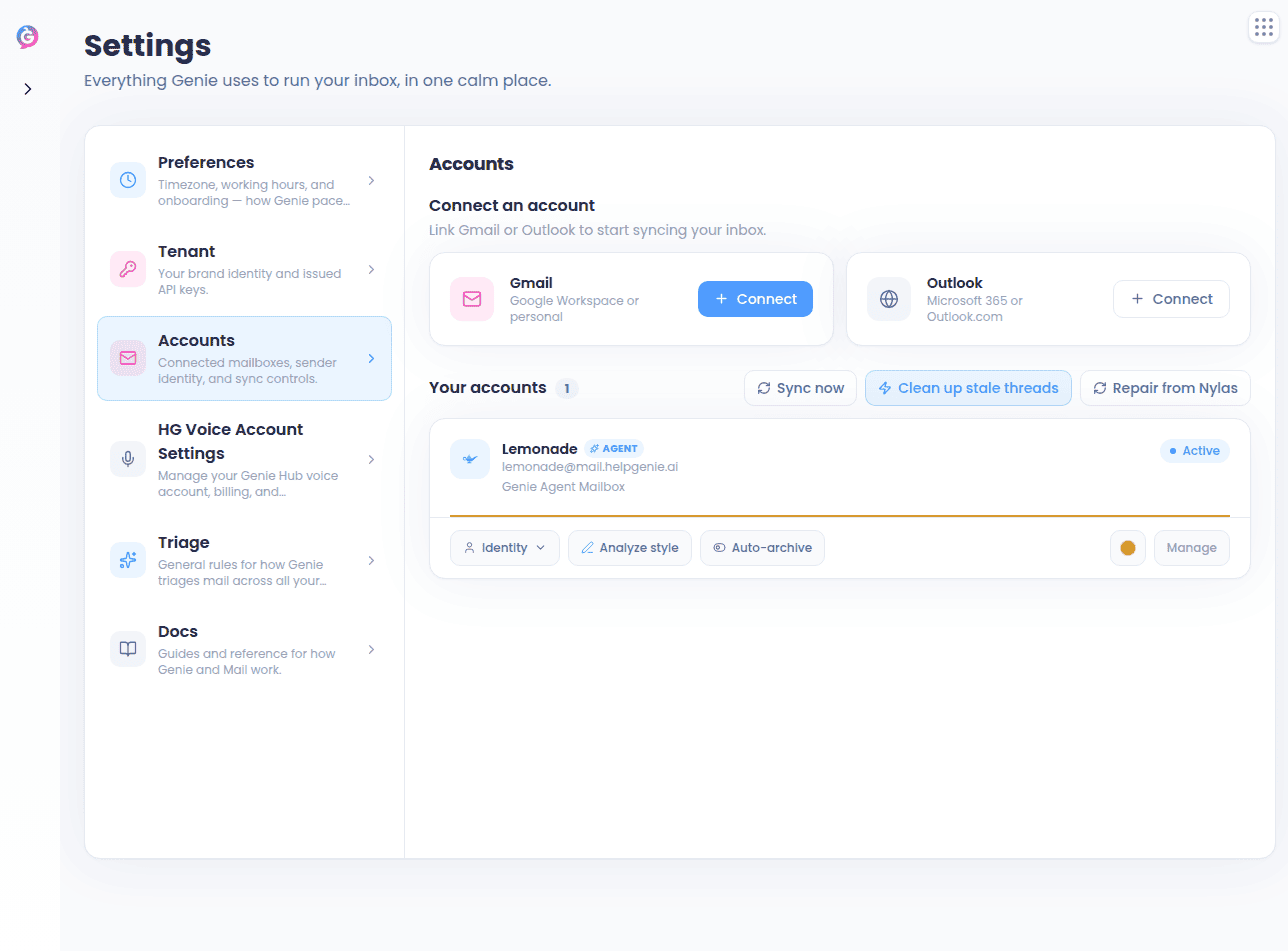
Settings → Accounts — the Connect an account section at the top of the accounts panel, which has a Gmail card and an Outlook card. Press Connect on whichever one you want.
1
Choose your provider
Press Connect on the Gmail or Outlook card from either entry point above.
2
Sign in with your provider
You’re taken to Google’s or Microsoft’s official sign-in page. Sign in and approve the requested permissions.
3
Syncing starts automatically
You’re returned to Help Genie Mail and syncing begins right away.
If something goes wrong, a red banner stays visible on the Accounts panel explaining the error until you dismiss it or retry.
A connect attempt has to be finished within about 10 minutes. If you leave the sign-in page sitting open longer than that, you’ll see an expiry message — just press Connect again to start over.
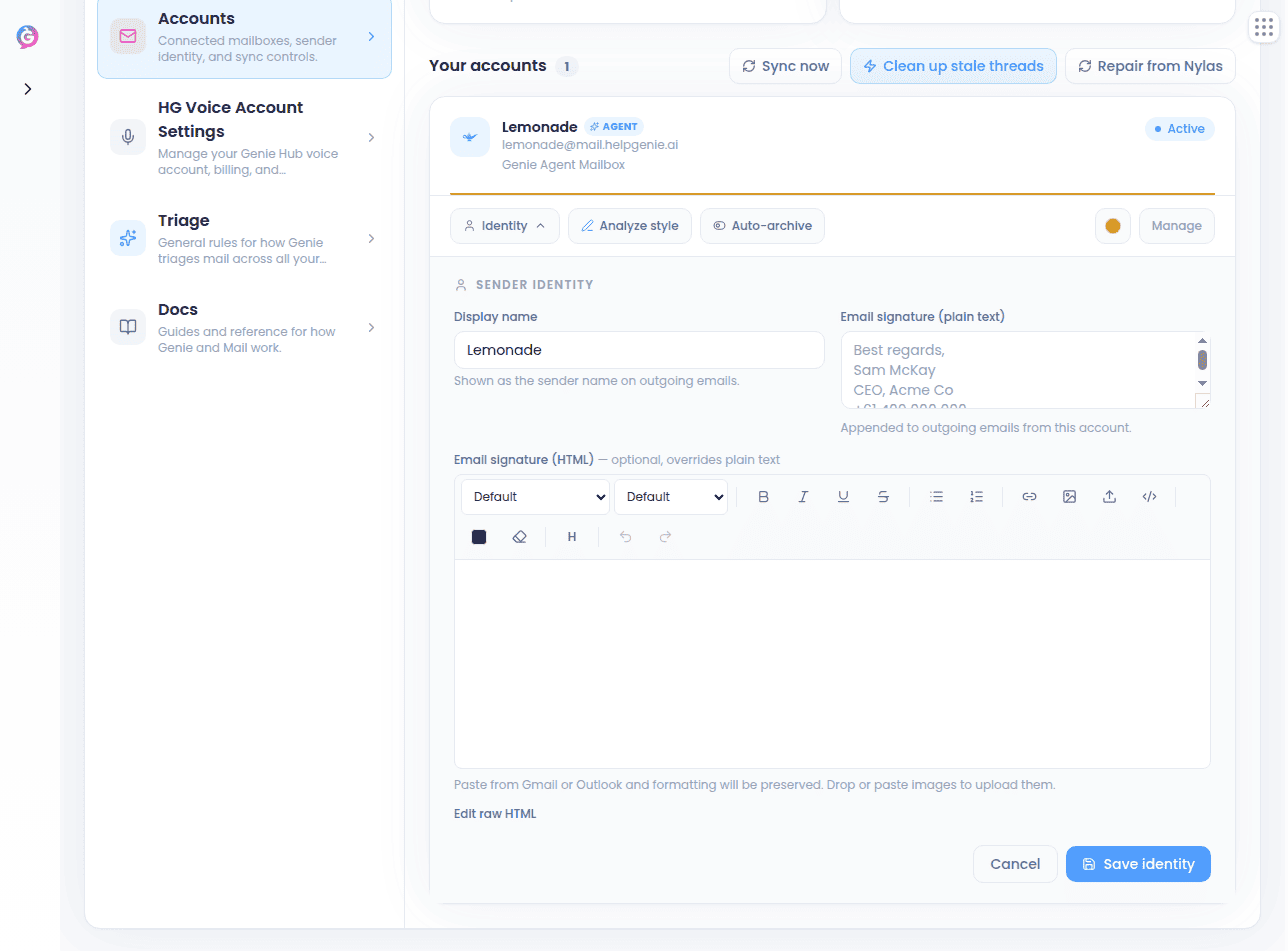
Every account has its own card in Settings → Accounts. From that card you can:
Press Identity to set the display name and email signature (both plain text and HTML)
Analyze style — let us learn your tone from mail you’ve already sent
Toggle Auto-archive
Pick an account color used to tint the account across the app, or Clear color to go back to the default
Remove the account with the trash button
If an account ever stops working, its card shows a Reconnect needed badge.Above the account cards you’ll find a toolbar with Sync now, Clean up stale threads (archives threads that are no longer in your Gmail or Outlook inbox), and Repair from Nylas — the last one is useful if a card says “Reconnect needed” even though the connection is actually fine.
Remove an account with the trash button on its card in Settings → Accounts, then confirm. During onboarding the same thing is called Disconnect. Either way this stops sync and revokes our access to the mailbox, but it never deletes your mail from your provider.
You don’t connect a Genie mailbox from here — those are provisioned in Help Genie Voice. See Creating a Genie mailbox in Genies Home & Mailbox Detail for how, and that page’s Overview tab section for managing one once it exists.
{"docsConfig":{"theme":"mint","$schema":"https://mintlify.com/docs.json","name":"Help Genie","description":"API documentation for the Help Genie voice AI platform","colors":{"primary":"#4E9CFF","light":"#7BB8FF","dark":"#2B7FE8"},"logo":{"light":"https://mintcdn.com/helpgenie/a134Jyg1BOpqw0vP/logo/light.png?fit=max\u0026auto=format\u0026n=a134Jyg1BOpqw0vP\u0026q=85\u0026s=f29d097a201254a8a750843d0d692c50","dark":"https://mintcdn.com/helpgenie/a134Jyg1BOpqw0vP/logo/dark.png?fit=max\u0026auto=format\u0026n=a134Jyg1BOpqw0vP\u0026q=85\u0026s=f00cbee677f1f3a3f46d463cb7cbad38","href":"https://helpgenie.ai"},"favicon":"https://mintcdn.com/helpgenie/17V8AwVjtycIuhCm/favicon.svg?fit=max\u0026auto=format\u0026n=17V8AwVjtycIuhCm\u0026q=85\u0026s=8a7865e1c10e3dacc378789f70f5ef6e","navbar":{"links":[{"href":"mailto:support@helpgenie.ai","label":"Support"}],"primary":{"type":"button","label":"Dashboard","href":"https://helpgenie.ai/dashboard"}},"footer":{"socials":{"linkedin":"https://linkedin.com/company/helpgenie"}},"contextual":{"options":["copy","view","chatgpt","claude"],"display":"header"},"styling":{"latex":false},"navigation":{"global":{"anchors":[{"anchor":"Help Genie Voice","icon":"microphone","href":"https://helpgenie.ai"},{"anchor":"Help Genie Mail","icon":"envelope","href":"https://mail.helpgenie.ai"},{"anchor":"Help Genie Outbound","icon":"phone","href":"https://outbound.helpgenie.ai"},{"anchor":"Help Genie Sync","icon":"arrows-rotate","href":"https://sync.helpgenie.ai"}]},"pages":[]}},"deployment":{"deploymentMetadataValue":{"subdomain":"helpgenie","hasAudioNarration":false,"actualSubdomain":"helpgenie","customDomains":["docs.helpgenie.ai"],"gitSource":{"type":"github","owner":"help-genie-ai","repo":"help-genie-docs","deployBranch":"main","contentDirectory":"","isPrivate":true,"mountPath":"","label":""},"chroma":{"liveDeploymentHistoryId":"6ae87ce4b4392014d523c4e2","collectionId":"bbae4e4b-9002-4a93-98f2-e08770fa65d5","schemaVersion":"v3","latestBuiltDeploymentHistoryId":"6ae87ce4b4392014d523c4e2"},"entitlements":{},"buildId":"6ae87ce4b4392014d523c4e2","clientVersion":"0.0.4064","searchFilterCounts":[{"language":"default","tag":"API reference","count":57},{"language":"default","tag":"Voice","count":33},{"language":"default","tag":"Overview","count":20},{"language":"default","tag":"Expanded Platform","count":17},{"language":"default","tag":"Sync","count":13},{"language":"default","tag":"Mail","count":11},{"language":"default","tag":"Outbound","count":9},{"language":"default","tag":"Knowledge","count":7},{"language":"default","tag":"Working with mail","count":6},{"language":"default","tag":"Configuring a Genie","count":6}]},"assistantConfig":{"enableAskAiButton":false,"enableStarterQuestions":false,"enableAskAiSearchBar":true},"basePath":"","hasChatPermissions":false,"hasWebMcpPermissions":false,"toggles":[{"name":"kill-isr","enabled":true,"variant":{"name":"disabled","enabled":false,"feature_enabled":true},"impressionData":false},{"name":"agent-mintlify-slack","enabled":true,"variant":{"name":"disabled","enabled":false,"feature_enabled":true},"impressionData":false},{"name":"agent-integrations-settings","enabled":true,"variant":{"name":"disabled","enabled":false,"feature_enabled":true},"impressionData":false},{"name":"rbac-expansion","enabled":true,"variant":{"name":"disabled","enabled":false,"feature_enabled":true},"impressionData":false},{"name":"automations-pr-grouping","enabled":true,"variant":{"name":"disabled","enabled":false,"feature_enabled":true},"impressionData":false},{"name":"custom-prefix","enabled":true,"variant":{"name":"disabled","enabled":false,"feature_enabled":true},"impressionData":false},{"name":"analytics-v7","enabled":true,"variant":{"name":"disabled","enabled":false,"feature_enabled":true},"impressionData":false},{"name":"user-flows-analytics","enabled":true,"variant":{"name":"disabled","enabled":false,"feature_enabled":true},"impressionData":false},{"name":"no-publish-flow","enabled":true,"variant":{"name":"disabled","enabled":false,"feature_enabled":true},"impressionData":false},{"name":"workos-onboarding","enabled":true,"variant":{"name":"disabled","enabled":false,"feature_enabled":true},"impressionData":false},{"name":"llms-txt-v2","enabled":true,"variant":{"name":"disabled","enabled":false,"feature_enabled":true},"impressionData":false},{"name":"snapshot-serving-live","enabled":true,"variant":{"name":"disabled","enabled":false,"feature_enabled":true},"impressionData":false},{"name":"stripTemperatureMiddleware","enabled":true,"variant":{"name":"disabled","enabled":false,"feature_enabled":true},"impressionData":false},{"name":"support-platform-pylon-zendesk","enabled":true,"variant":{"name":"disabled","enabled":false,"feature_enabled":true},"impressionData":false},{"name":"snapshot-serving","enabled":true,"variant":{"name":"disabled","enabled":false,"feature_enabled":true},"impressionData":false},{"name":"instant-rollback","enabled":true,"variant":{"name":"disabled","enabled":false,"feature_enabled":true},"impressionData":false},{"name":"granular-notifications-server","enabled":true,"variant":{"name":"disabled","enabled":false,"feature_enabled":true},"impressionData":false},{"name":"granular-notifications","enabled":true,"variant":{"name":"disabled","enabled":false,"feature_enabled":true},"impressionData":false},{"name":"automations-fable","enabled":true,"variant":{"name":"disabled","enabled":false,"feature_enabled":true},"impressionData":false},{"name":"fixed-ai-action-pricing","enabled":true,"variant":{"name":"disabled","enabled":false,"feature_enabled":true},"impressionData":false},{"name":"automation-resolve-merge-conflict","enabled":true,"variant":{"name":"disabled","enabled":false,"feature_enabled":true},"impressionData":false},{"name":"scoped-publishing","enabled":true,"variant":{"name":"disabled","enabled":false,"feature_enabled":true},"impressionData":false},{"name":"mintql","enabled":true,"variant":{"name":"disabled","enabled":false,"feature_enabled":true},"impressionData":false},{"name":"page-level-analytics","enabled":true,"variant":{"name":"disabled","enabled":false,"feature_enabled":true},"impressionData":false},{"name":"editor-version-history-v2","enabled":true,"variant":{"name":"disabled","enabled":false,"feature_enabled":true},"impressionData":false},{"name":"billing-page-v2","enabled":true,"variant":{"name":"disabled","enabled":false,"feature_enabled":true},"impressionData":false},{"name":"full-page-search","enabled":true,"variant":{"name":"disabled","enabled":false,"feature_enabled":true},"impressionData":false},{"name":"workspace-projects","enabled":true,"variant":{"name":"disabled","enabled":false,"feature_enabled":true},"impressionData":false},{"name":"assistant-v5","enabled":true,"variant":{"name":"disabled","enabled":false,"feature_enabled":true},"impressionData":false},{"name":"fork-pr-previews","enabled":true,"variant":{"name":"disabled","enabled":false,"feature_enabled":true},"impressionData":false},{"name":"revalidation-jwt","enabled":true,"variant":{"name":"disabled","enabled":false,"feature_enabled":true},"impressionData":false},{"name":"vite-origin","enabled":true,"variant":{"name":"disabled","enabled":false,"feature_enabled":true},"impressionData":false},{"name":"workos-sso-scim","enabled":true,"variant":{"name":"disabled","enabled":false,"feature_enabled":true},"impressionData":false},{"name":"hobby-abuse-scan","enabled":true,"variant":{"name":"disabled","enabled":false,"feature_enabled":true},"impressionData":false},{"name":"dashboard-inbox","enabled":true,"variant":{"name":"disabled","enabled":false,"feature_enabled":true},"impressionData":false},{"name":"workos-signup","enabled":true,"variant":{"name":"disabled","enabled":false,"feature_enabled":true},"impressionData":false},{"name":"turbopuffer-dual-write","enabled":true,"variant":{"name":"disabled","enabled":false,"feature_enabled":true},"impressionData":false},{"name":"workos-enabled","enabled":true,"variant":{"name":"disabled","enabled":false,"feature_enabled":true},"impressionData":false},{"name":"approve-review-flow","enabled":true,"variant":{"name":"disabled","enabled":false,"feature_enabled":true},"impressionData":false},{"name":"sso-setup-deadline-banner","enabled":true,"variant":{"name":"disabled","enabled":false,"feature_enabled":true},"impressionData":false},{"name":"turbopuffer-serve","enabled":true,"variant":{"name":"disabled","enabled":false,"feature_enabled":true},"impressionData":false}],"googleFontsInlined":false},"customCss":[],"page":{"pagePath":"mail-guide/connecting-accounts","slug":"/mail-guide/connecting-accounts","pageMetadata":{"title":"Connecting Your Email Account","description":"Link Gmail or Outlook so Help Genie Mail can read, triage, and send","href":"/mail-guide/connecting-accounts"},"description":{"compiledSource":"\"use strict\";\nconst {jsx: _jsx} = arguments[0];\nconst {useMDXComponents: _provideComponents} = arguments[0];\nfunction _createMdxContent(props) {\n const _components = {\n p: \"p\",\n ..._provideComponents(),\n ...props.components\n };\n return _jsx(_components.p, {\n children: \"Link Gmail or Outlook so Help Genie Mail can read, triage, and send\"\n });\n}\nfunction MDXContent(props = {}) {\n const {wrapper: MDXLayout} = {\n ..._provideComponents(),\n ...props.components\n };\n return MDXLayout ? _jsx(MDXLayout, {\n ...props,\n children: _jsx(_createMdxContent, {\n ...props\n })\n }) : _createMdxContent(props);\n}\nreturn {\n default: MDXContent\n};\n","frontmatter":{},"scope":{}},"pageType":"default","mdx":{"mdxSource":{"compiledSource":"\"use strict\";const{Fragment:_Fragment,jsx:_jsx,jsxs:_jsxs}=arguments[0];const{useMDXComponents:_provideComponents}=arguments[0];function _createMdxContent(props){const _components={a:`a`,em:`em`,li:`li`,p:`p`,strong:`strong`,ul:`ul`,..._provideComponents(),...props.components},{Frame,Heading,Note,OptimizedImage,Step,Steps,Tip}=_components;if(!Frame)_missingMdxReference(`Frame`,true);if(!Heading)_missingMdxReference(`Heading`,true);if(!Note)_missingMdxReference(`Note`,true);if(!OptimizedImage)_missingMdxReference(`OptimizedImage`,true);if(!Step)_missingMdxReference(`Step`,true);if(!Steps)_missingMdxReference(`Steps`,true);if(!Tip)_missingMdxReference(`Tip`,true);return _jsxs(_Fragment,{children:[_jsxs(_components.p,{children:[`Help Genie Mail works with `,_jsx(_components.strong,{children:`Gmail`}),` and `,_jsx(_components.strong,{children:`Outlook`}),`. Connecting an account is the first step before the app can sync any mail — you sign in on Google’s or Microsoft’s own page, so your password is never seen or stored by us. For Gmail, the Google consent screen shows `,_jsx(_components.strong,{children:`Help Genie Mail`}),` as the app asking for access.`]}),`\n`,_jsx(Heading,{level:`2`,id:`where-to-connect`,children:`Where to connect`}),`\n`,_jsx(_components.p,{children:`There are two places you can start the connection:`}),`\n`,_jsxs(_components.ul,{children:[`\n`,_jsxs(_components.li,{children:[_jsx(_components.strong,{children:`Onboarding, step 2`}),` — the `,_jsx(_components.em,{children:`Connect your own inbox`}),` step of the welcome flow. You can skip this step and still finish onboarding.`]}),`\n`,_jsxs(_components.li,{children:[_jsx(_components.strong,{children:`Settings → Accounts`}),` — the `,_jsx(_components.em,{children:`Connect an account`}),` section at the top of the accounts panel, which has a `,_jsx(_components.strong,{children:`Gmail`}),` card and an `,_jsx(_components.strong,{children:`Outlook`}),` card. Press `,_jsx(_components.strong,{children:`Connect`}),` on whichever one you want.`]}),`\n`]}),`\n`,_jsx(Frame,{children:_jsx(OptimizedImage,{src:`https://mintcdn.com/helpgenie/kyhW1dCBKT_xK1xG/images/mail-guide/connecting-accounts.png?fit=max\u0026auto=format\u0026n=kyhW1dCBKT_xK1xG\u0026q=85\u0026s=15c28bbfe94202f29d1d5584eb033127`,alt:`Accounts panel with the Gmail and Outlook connect cards`,\"data-og-width\":`1288`,width:`1288`,\"data-og-height\":`951`,height:`951`,\"data-path\":`images/mail-guide/connecting-accounts.png`,\"data-optimize\":`true`,\"data-opv\":`3`,srcset:`https://mintcdn.com/helpgenie/kyhW1dCBKT_xK1xG/images/mail-guide/connecting-accounts.png?w=280\u0026fit=max\u0026auto=format\u0026n=kyhW1dCBKT_xK1xG\u0026q=85\u0026s=a2b9d794b8e0e8473303f3f2be925122 280w, https://mintcdn.com/helpgenie/kyhW1dCBKT_xK1xG/images/mail-guide/connecting-accounts.png?w=560\u0026fit=max\u0026auto=format\u0026n=kyhW1dCBKT_xK1xG\u0026q=85\u0026s=49ebba7f625f67697e9dafddac82ac2d 560w, https://mintcdn.com/helpgenie/kyhW1dCBKT_xK1xG/images/mail-guide/connecting-accounts.png?w=840\u0026fit=max\u0026auto=format\u0026n=kyhW1dCBKT_xK1xG\u0026q=85\u0026s=9eb964f94f8e4cde9efee4ed1913b62d 840w, https://mintcdn.com/helpgenie/kyhW1dCBKT_xK1xG/images/mail-guide/connecting-accounts.png?w=1100\u0026fit=max\u0026auto=format\u0026n=kyhW1dCBKT_xK1xG\u0026q=85\u0026s=34be915c3252dbc2d0a826ab7ee4d6d3 1100w, https://mintcdn.com/helpgenie/kyhW1dCBKT_xK1xG/images/mail-guide/connecting-accounts.png?w=1650\u0026fit=max\u0026auto=format\u0026n=kyhW1dCBKT_xK1xG\u0026q=85\u0026s=cadc4fd841c4845a3badfce97cfede57 1650w, https://mintcdn.com/helpgenie/kyhW1dCBKT_xK1xG/images/mail-guide/connecting-accounts.png?w=2500\u0026fit=max\u0026auto=format\u0026n=kyhW1dCBKT_xK1xG\u0026q=85\u0026s=248150addd77dffc974393072ed1b707 2500w`})}),`\n`,_jsxs(Steps,{children:[_jsx(Step,{title:`Choose your provider`,children:_jsxs(_components.p,{children:[`Press `,_jsx(_components.strong,{children:`Connect`}),` on the `,_jsx(_components.strong,{children:`Gmail`}),` or `,_jsx(_components.strong,{children:`Outlook`}),` card from either entry point above.`]})}),_jsx(Step,{title:`Sign in with your provider`,children:_jsx(_components.p,{children:`You’re taken to Google’s or Microsoft’s official sign-in page. Sign in and approve the requested permissions.`})}),_jsx(Step,{title:`Syncing starts automatically`,children:_jsx(_components.p,{children:`You’re returned to Help Genie Mail and syncing begins right away.`})})]}),`\n`,_jsx(Note,{children:_jsx(_components.p,{children:`If something goes wrong, a red banner stays visible on the Accounts panel explaining the error until you dismiss it or retry.`})}),`\n`,_jsx(Tip,{children:_jsxs(_components.p,{children:[`A connect attempt has to be finished within about 10 minutes. If you leave the sign-in page sitting open longer than that, you’ll see an expiry message — just press `,_jsx(_components.strong,{children:`Connect`}),` again to start over.`]})}),`\n`,_jsx(Heading,{level:`2`,id:`managing-a-connected-account`,children:`Managing a connected account`}),`\n`,_jsxs(_components.p,{children:[`Every account has its own card in `,_jsx(_components.strong,{children:`Settings → Accounts`}),`. From that card you can:`]}),`\n`,_jsxs(_components.ul,{children:[`\n`,_jsxs(_components.li,{children:[`Press `,_jsx(_components.strong,{children:`Identity`}),` to set the `,_jsx(_components.strong,{children:`display name`}),` and `,_jsx(_components.strong,{children:`email signature`}),` (both plain text and HTML)`]}),`\n`,_jsxs(_components.li,{children:[_jsx(_components.strong,{children:`Analyze style`}),` — let us learn your tone from mail you’ve already sent`]}),`\n`,_jsxs(_components.li,{children:[`Toggle `,_jsx(_components.strong,{children:`Auto-archive`})]}),`\n`,_jsxs(_components.li,{children:[`Pick an `,_jsx(_components.strong,{children:`account color`}),` used to tint the account across the app, or `,_jsx(_components.strong,{children:`Clear color`}),` to go back to the default`]}),`\n`,_jsxs(_components.li,{children:[_jsx(_components.strong,{children:`Remove`}),` the account with the trash button`]}),`\n`]}),`\n`,_jsx(Frame,{children:_jsx(OptimizedImage,{src:`https://mintcdn.com/helpgenie/kyhW1dCBKT_xK1xG/images/mail-guide/connecting-accounts-manage.png?fit=max\u0026auto=format\u0026n=kyhW1dCBKT_xK1xG\u0026q=85\u0026s=d8f64d0476977928b6270d89b4949046`,alt:`An account card with identity, signature, and color controls`,\"data-og-width\":`1288`,width:`1288`,\"data-og-height\":`951`,height:`951`,\"data-path\":`images/mail-guide/connecting-accounts-manage.png`,\"data-optimize\":`true`,\"data-opv\":`3`,srcset:`https://mintcdn.com/helpgenie/kyhW1dCBKT_xK1xG/images/mail-guide/connecting-accounts-manage.png?w=280\u0026fit=max\u0026auto=format\u0026n=kyhW1dCBKT_xK1xG\u0026q=85\u0026s=8bcb2a69f08c223a18e87eff56671c00 280w, https://mintcdn.com/helpgenie/kyhW1dCBKT_xK1xG/images/mail-guide/connecting-accounts-manage.png?w=560\u0026fit=max\u0026auto=format\u0026n=kyhW1dCBKT_xK1xG\u0026q=85\u0026s=7f3cf393b7a7669bab0096a9e74e399d 560w, https://mintcdn.com/helpgenie/kyhW1dCBKT_xK1xG/images/mail-guide/connecting-accounts-manage.png?w=840\u0026fit=max\u0026auto=format\u0026n=kyhW1dCBKT_xK1xG\u0026q=85\u0026s=091a8dcfefd6ec3b45f4a83f13d57bd6 840w, https://mintcdn.com/helpgenie/kyhW1dCBKT_xK1xG/images/mail-guide/connecting-accounts-manage.png?w=1100\u0026fit=max\u0026auto=format\u0026n=kyhW1dCBKT_xK1xG\u0026q=85\u0026s=e65a60972e12ae35c2d8863fae72bc44 1100w, https://mintcdn.com/helpgenie/kyhW1dCBKT_xK1xG/images/mail-guide/connecting-accounts-manage.png?w=1650\u0026fit=max\u0026auto=format\u0026n=kyhW1dCBKT_xK1xG\u0026q=85\u0026s=0f81e21595eb55b6fa27ce77bf78c31c 1650w, https://mintcdn.com/helpgenie/kyhW1dCBKT_xK1xG/images/mail-guide/connecting-accounts-manage.png?w=2500\u0026fit=max\u0026auto=format\u0026n=kyhW1dCBKT_xK1xG\u0026q=85\u0026s=d92adb8359d4b47d121b69066143e755 2500w`})}),`\n`,_jsxs(_components.p,{children:[`If an account ever stops working, its card shows a `,_jsx(_components.strong,{children:`Reconnect needed`}),` badge.`]}),`\n`,_jsxs(_components.p,{children:[`Above the account cards you’ll find a toolbar with `,_jsx(_components.strong,{children:`Sync now`}),`, `,_jsx(_components.strong,{children:`Clean up stale threads`}),` (archives threads that are no longer in your Gmail or Outlook inbox), and `,_jsx(_components.strong,{children:`Repair from Nylas`}),` — the last one is useful if a card says “Reconnect needed” even though the connection is actually fine.`]}),`\n`,_jsx(Heading,{level:`2`,id:`disconnecting`,children:`Disconnecting`}),`\n`,_jsxs(_components.p,{children:[`Remove an account with the trash button on its card in `,_jsx(_components.strong,{children:`Settings → Accounts`}),`, then confirm. During onboarding the same thing is called `,_jsx(_components.strong,{children:`Disconnect`}),`. Either way this stops sync and revokes our access to the mailbox, but it never deletes your mail from your provider.`]}),`\n`,_jsx(Heading,{level:`2`,id:`genie-mailboxes`,children:`Genie mailboxes`}),`\n`,_jsxs(_components.p,{children:[`You don’t connect a Genie mailbox from here — those are provisioned in Help Genie Voice. See `,_jsx(_components.strong,{children:`Creating a Genie mailbox`}),` in `,_jsx(_components.a,{href:`/mail-guide/genies-home`,children:`Genies Home \u0026 Mailbox Detail`}),` for how, and that page’s Overview tab section for managing one once it exists.`]})]})}function MDXContent(props={}){const{wrapper:MDXLayout}={..._provideComponents(),...props.components};return MDXLayout?_jsx(MDXLayout,{...props,children:_jsx(_createMdxContent,{...props})}):_createMdxContent(props)}return{default:MDXContent};function _missingMdxReference(id,component){throw new Error(`Expected `+(component?`component`:`object`)+\" `\"+id+\"` to be defined: you likely forgot to import, pass, or provide it.\")}","frontmatter":{},"scope":{"config":{},"pageMetadata":{"title":"Connecting Your Email Account","description":"Link Gmail or Outlook so Help Genie Mail can read, triage, and send","href":"/mail-guide/connecting-accounts"}}},"mdxSourceWithNoJs":null},"mdxExtracts":{"tableOfContents":[{"title":"Where to connect","slug":"where-to-connect","depth":2,"children":[]},{"title":"Managing a connected account","slug":"managing-a-connected-account","depth":2,"children":[]},{"title":"Disconnecting","slug":"disconnecting","depth":2,"children":[]},{"title":"Genie mailboxes","slug":"genie-mailboxes","depth":2,"children":[]}],"codeExamples":{}},"jsLinks":[],"subdomain":"helpgenie","siteName":"Help Genie","title":"Connecting Your Email Account - Help Genie","navMaps":{"firstHrefInVersion":{},"firstHrefInLanguage":{}},"lastModified":"2026-10-02T06:58:50.064Z","originalFileLocation":"mail-guide/connecting-accounts.mdx"},"headHtml":"\u003cscript data-mint-head>(function(){var d=document.documentElement,p=null;if(!p){try{p=localStorage.getItem(\"isDarkMode\")}catch(e){}if(p==='true')p='dark';else if(p==='false')p='light';if(p!=='light'\u0026\u0026p!=='dark'\u0026\u0026p!=='system')p=\"system\"}var r=p==='system'?(matchMedia(\"(prefers-color-scheme: dark)\").matches?'dark':'light'):p;d.classList.remove(r==='dark'?'light':'dark');d.classList.add(r);d.setAttribute(\"data-theme-preference\",p)})();\u003c/script>\u003cmeta data-mint-head name=\"description\" content=\"Link Gmail or Outlook so Help Genie Mail can read, triage, and send\">\u003cmeta data-mint-head name=\"application-name\" content=\"Help Genie\">\u003cmeta data-mint-head name=\"generator\" content=\"Mintlify\">\u003clink data-mint-head rel=\"icon\" type=\"image/png\" sizes=\"192x192\" href=\"/mintlify-assets/_mintlify/favicons/helpgenie/ypdPY4Ery9DMUCww/_generated/favicon/android-chrome-192x192.png\" media=\"(prefers-color-scheme: light)\">\u003clink data-mint-head rel=\"apple-touch-icon\" type=\"image/png\" sizes=\"180x180\" href=\"/mintlify-assets/_mintlify/favicons/helpgenie/ypdPY4Ery9DMUCww/_generated/favicon/apple-touch-icon.png\">\u003clink data-mint-head rel=\"icon\" type=\"image/png\" sizes=\"16x16\" href=\"/mintlify-assets/_mintlify/favicons/helpgenie/ypdPY4Ery9DMUCww/_generated/favicon/favicon-16x16.png\" media=\"(prefers-color-scheme: light)\">\u003clink data-mint-head rel=\"icon\" type=\"image/png\" sizes=\"32x32\" href=\"/mintlify-assets/_mintlify/favicons/helpgenie/ypdPY4Ery9DMUCww/_generated/favicon/favicon-32x32.png\" media=\"(prefers-color-scheme: light)\">\u003clink data-mint-head rel=\"shortcut icon\" type=\"image/x-icon\" href=\"/mintlify-assets/_mintlify/favicons/helpgenie/ypdPY4Ery9DMUCww/_generated/favicon/favicon.ico\" media=\"(prefers-color-scheme: light)\">\u003clink data-mint-head rel=\"icon\" type=\"image/png\" sizes=\"192x192\" href=\"/mintlify-assets/_mintlify/favicons/helpgenie/ypdPY4Ery9DMUCww/_generated/favicon-dark/android-chrome-192x192.png\" media=\"(prefers-color-scheme: dark)\">\u003clink data-mint-head rel=\"icon\" type=\"image/png\" sizes=\"16x16\" href=\"/mintlify-assets/_mintlify/favicons/helpgenie/ypdPY4Ery9DMUCww/_generated/favicon-dark/favicon-16x16.png\" media=\"(prefers-color-scheme: dark)\">\u003clink data-mint-head rel=\"icon\" type=\"image/png\" sizes=\"32x32\" href=\"/mintlify-assets/_mintlify/favicons/helpgenie/ypdPY4Ery9DMUCww/_generated/favicon-dark/favicon-32x32.png\" media=\"(prefers-color-scheme: dark)\">\u003clink data-mint-head rel=\"shortcut icon\" type=\"image/x-icon\" href=\"/mintlify-assets/_mintlify/favicons/helpgenie/ypdPY4Ery9DMUCww/_generated/favicon-dark/favicon.ico\" media=\"(prefers-color-scheme: dark)\">\u003cmeta data-mint-head property=\"og:title\" content=\"Connecting Your Email Account - Help Genie\">\u003cmeta data-mint-head property=\"og:description\" content=\"Link Gmail or Outlook so Help Genie Mail can read, triage, and send\">\u003cmeta data-mint-head property=\"og:site_name\" content=\"Help Genie\">\u003cmeta data-mint-head property=\"og:url\" content=\"https://docs.helpgenie.ai/mail-guide/connecting-accounts\">\u003cmeta data-mint-head property=\"og:type\" content=\"website\">\u003cmeta data-mint-head property=\"og:image\" content=\"https://helpgenie.mintlify.app/_mintlify/api/og/v2?division=Overview\u0026amp;title=Connecting+Your+Email+Account\u0026amp;description=Link+Gmail+or+Outlook+so+Help+Genie+Mail+can+read%2C+triage%2C+and+send\u0026amp;theme=a70d60f8f0dc8a6733cc1c6c\u0026amp;signature=a4e2b631fe1703a98686e640802bb527c22e0dedeb72a35a1a386d7a7bfdcddc\">\u003cmeta data-mint-head property=\"og:image:width\" content=\"1200\">\u003cmeta data-mint-head property=\"og:image:height\" content=\"630\">\u003cmeta data-mint-head name=\"twitter:card\" content=\"summary_large_image\">\u003cmeta data-mint-head name=\"twitter:title\" content=\"Connecting Your Email Account - Help Genie\">\u003cmeta data-mint-head name=\"twitter:description\" content=\"Link Gmail or Outlook so Help Genie Mail can read, triage, and send\">\u003cmeta data-mint-head name=\"twitter:image\" content=\"https://helpgenie.mintlify.app/_mintlify/api/og/v2?division=Overview\u0026amp;title=Connecting+Your+Email+Account\u0026amp;description=Link+Gmail+or+Outlook+so+Help+Genie+Mail+can+read%2C+triage%2C+and+send\u0026amp;theme=a70d60f8f0dc8a6733cc1c6c\u0026amp;signature=a4e2b631fe1703a98686e640802bb527c22e0dedeb72a35a1a386d7a7bfdcddc\">\u003cmeta data-mint-head name=\"twitter:image:width\" content=\"1200\">\u003cmeta data-mint-head name=\"twitter:image:height\" content=\"630\">\u003cmeta data-mint-head name=\"msapplication-config\" content=\"/mintlify-assets/_mintlify/favicons/helpgenie/ypdPY4Ery9DMUCww/_generated/favicon/browserconfig.xml\">\u003cmeta data-mint-head name=\"apple-mobile-web-app-title\" content=\"Help Genie\">\u003cmeta data-mint-head name=\"msapplication-TileColor\" content=\"#4E9CFF\">\u003clink data-mint-head rel=\"canonical\" href=\"https://docs.helpgenie.ai/mail-guide/connecting-accounts\">\u003clink data-mint-head rel=\"alternate\" type=\"application/xml\" href=\"/sitemap.xml\">\u003clink data-mint-head rel=\"alternate\" type=\"text/markdown\" href=\"/mail-guide/connecting-accounts.md\">\u003cscript data-mint-head type=\"application/ld+json\">{\"@context\":\"https://schema.org\",\"@graph\":[{\"@type\":\"Organization\",\"@id\":\"https://docs.helpgenie.ai/#organization\",\"name\":\"Help Genie\",\"url\":\"https://docs.helpgenie.ai\",\"logo\":{\"@type\":\"ImageObject\",\"url\":\"https://mintcdn.com/helpgenie/a134Jyg1BOpqw0vP/logo/light.png?fit=max\u0026auto=format\u0026n=a134Jyg1BOpqw0vP\u0026q=85\u0026s=f29d097a201254a8a750843d0d692c50\"}},{\"@type\":\"WebSite\",\"@id\":\"https://docs.helpgenie.ai#website\",\"name\":\"Help Genie\",\"url\":\"https://docs.helpgenie.ai\",\"publisher\":{\"@id\":\"https://docs.helpgenie.ai/#organization\"}},{\"@type\":\"WebPage\",\"@id\":\"https://docs.helpgenie.ai/mail-guide/connecting-accounts#webpage\",\"url\":\"https://docs.helpgenie.ai/mail-guide/connecting-accounts\",\"name\":\"Connecting Your Email Account\",\"description\":\"Link Gmail or Outlook so Help Genie Mail can read, triage, and send\",\"dateModified\":\"2026-10-02T06:58:50.064Z\",\"isPartOf\":{\"@id\":\"https://docs.helpgenie.ai#website\"},\"breadcrumb\":{\"@id\":\"https://docs.helpgenie.ai/mail-guide/connecting-accounts#breadcrumb\"}},{\"@type\":\"BreadcrumbList\",\"@id\":\"https://docs.helpgenie.ai/mail-guide/connecting-accounts#breadcrumb\",\"itemListElement\":[{\"@type\":\"ListItem\",\"position\":1,\"name\":\"Overview\",\"item\":\"https://docs.helpgenie.ai/mail-guide/introduction\"},{\"@type\":\"ListItem\",\"position\":2,\"name\":\"Connecting Your Email Account\",\"item\":\"https://docs.helpgenie.ai/mail-guide/connecting-accounts\"}]},{\"@type\":[\"Article\",\"TechArticle\"],\"@id\":\"https://docs.helpgenie.ai/mail-guide/connecting-accounts#article\",\"headline\":\"Connecting Your Email Account\",\"name\":\"Connecting Your Email Account\",\"description\":\"Link Gmail or Outlook so Help Genie Mail can read, triage, and send\",\"url\":\"https://docs.helpgenie.ai/mail-guide/connecting-accounts\",\"mainEntityOfPage\":{\"@id\":\"https://docs.helpgenie.ai/mail-guide/connecting-accounts#webpage\"},\"dateModified\":\"2026-10-02T06:58:50.064Z\",\"publisher\":{\"@id\":\"https://docs.helpgenie.ai/#organization\"},\"isPartOf\":{\"@id\":\"https://docs.helpgenie.ai#website\"}}]}\u003c/script>\u003cscript data-mint-head type=\"application/ld+json\">{\"@context\":\"https://schema.org\",\"@type\":\"WebSite\",\"name\":\"Help Genie\",\"creator\":{\"@type\":\"Organization\",\"name\":\"Mintlify\",\"url\":\"https://mintlify.com\"}}\u003c/script>","siteName":"Help Genie","nav":{"global":{"anchors":[{"anchor":"Help Genie Voice","icon":"microphone","href":"https://helpgenie.ai"},{"anchor":"Help Genie Mail","icon":"envelope","href":"https://mail.helpgenie.ai"},{"anchor":"Help Genie Outbound","icon":"phone","href":"https://outbound.helpgenie.ai"},{"anchor":"Help Genie Sync","icon":"arrows-rotate","href":"https://sync.helpgenie.ai"}]},"tabs":[{"tab":"Getting started","icon":"compass","pages":[{"title":"Getting started","href":""}]},{"tab":"API reference","icon":"code","pages":[{"title":"API reference","href":"/api-reference/introduction"}]},{"tab":"Voice","icon":"microphone","pages":[{"title":"Voice","href":"/voice-guide/my-genies-list"}]},{"tab":"Mail","icon":"envelope","groups":[{"group":"Overview","pages":[{"title":"Help Genie Mail","href":"/mail-guide/introduction"},{"title":"Signing In","href":"/mail-guide/sign-in"},{"title":"Getting Started","description":"The four-step welcome flow that meets your Genies and connects your inbox","href":"/mail-guide/onboarding"},{"title":"Connecting Your Email Account","href":"/mail-guide/connecting-accounts"}]},{"group":"Working with mail","pages":[{"title":"Genies Home \u0026 Mailbox Detail","description":"Browse your Genies and manage a mailbox's activity, brain, and lifecycle","href":"/mail-guide/genies-home"},{"title":"Genie Mailbox Detail","href":"/mail-guide/genie-mailbox-detail"},{"title":"Genie Decisions \u0026 the Brain","href":"/mail-guide/genie-feed"},{"title":"Inbox, Threads \u0026 Search","href":"/mail-guide/inbox-and-search"},{"title":"Compose, Forward \u0026 Suggested Replies","href":"/mail-guide/compose-and-send"},{"title":"Teach Genie","href":"/mail-guide/teach-genie"}]},{"group":"Account","pages":[{"title":"Settings","href":"/mail-guide/settings"}]}]},{"tab":"Outbound","icon":"phone","pages":[{"title":"Outbound","href":"/outbound-guide/introduction"}]},{"tab":"Sync","icon":"arrows-rotate","pages":[{"title":"Sync","href":"/sync-guide/introduction"}]}]},"basePath":"","title":"Connecting Your Email Account - Help Genie","buildId":"dpl_2gSLkbMoF5kkLsBqYzq9KWtDyJRo","deploymentId":"dpl_2gSLkbMoF5kkLsBqYzq9KWtDyJRo","dynamics":["07c022d89b","a74be98ba7"],"chunks":["Frame-Du0ep7S2.js","DynamicMarkdown-Jk8YAWGN.js","zoom-image-lightbox-DR0NJNUZ.js","lightbox-handle-r17bVUz3.js"]}